dbt + DuckDB + Dagster로 로컬 스타스키마 데이터 마트 구축하기
Oliste-커머스 공개 데이터셋을 활용하여 4계층 dbt 모델링 → 스타스키마 → Dagster 오케스트레이션까지 구현한 과정을 정리합니다.
목차
1. 프로젝트 소개
dbt_mini_mart는 Kaggle의 Brazilian E-Commerce Public Dataset by Olist 데이터를 활용한 학습용 데이터 마트 프로젝트입니다.
- 8개 원천 CSV 테이블 → 14개 dbt 모델 → 최종 ****스타스키마(Star Schema) 데이터 마트
- 5개 차원 테이블(dim) + 2개 팩트 테이블(fct)
- 71개 데이터 품질 테스트 + Dagster 기반 파이프라인 오케스트레이션
원천 데이터 구조
Olist 데이터셋은 브라질 e-커머스 주문 데이터로, 아래 8개 테이블로 구성됩니다:
| 테이블 | 설명 | Grain |
|---|---|---|
olist_orders | 주문 헤더 (상태, 일시) | order_id |
olist_order_items | 주문 아이템 (가격, 배송비) | order_id + order_item_id |
olist_order_payments | 결제 내역 (수단, 금액) | order_id + payment_sequential |
olist_order_reviews | 리뷰 (평점) | review_id |
olist_customers | 고객 마스터 | customer_id |
olist_products | 상품 속성 (카테고리, 무게) | product_id |
olist_sellers | 판매자 마스터 | seller_id |
product_category_name_translation | 카테고리명 번역 (포르투갈어→영문) | product_category_name |
2. 기술 스택과 선택 이유
전체 스택
| 도구 | 역할 | 버전 |
|---|---|---|
| dbt-core | SQL 모델링, 테스트, 문서화 | 1.8+ |
| DuckDB | 로컬 OLAP 웨어하우스 | 1.0+ |
| Dagster | 파이프라인 오케스트레이션 | 1.12+ |
| uv | Python 의존성 관리 | - |
| dbt_utils | 유틸리티 매크로/테스트 패키지 | 1.1+ |
이번 프로젝트에서는 dbt를 통한 데이터 웨어하우스 설계에 초점을 맞추어 가벼운 로컬 DB를 사용하였습니다.
DBT duckdb 연결 설정
# profiles.yml
mini_mart:
  target: dev
  outputs:
    dev:
      type: duckdb
      path: mini_mart.duckdb
      threads: 4
DBT SEED 사용하지 않은 이유
dbt seed는 소규모 참조 데이터에는 적합하지만, 수만~수십만 행의 원천 데이터를 매번 seed로 올리기엔 비효율적입니다.
- 현업에서는 소규모의 dim 테이블을 제외하고는 dbt seed를 사용할일이 없음.
이 프로젝트에서는 Python 스크립트로 CSV를 DuckDB에 벌크 로드하고, dbt에서는 source()로 참조하는 방식을 채택했습니다:
# scripts/load_raw_to_duckdb.py (핵심 부분)
con.execute("""
    create or replace table raw.{table} as
    select *, current_timestamp as _loaded_at
    from read_csv_auto(?, header=true)
""", [str(csv_path)])
_loaded_at 컬럼을 자동 추가해서 dbt의 source freshness 기능과 연동합니다.
왜 Dagster인가?
Airflow 대비 Dagster를 선택한 이유는 다음과 같습니다:
- Asset 중심 패러다임: dbt 모델이 곧 Dagster Asset으로 자동 매핑
- dagster-dbt 통합: manifest 기반으로 DAG를 자동 생성 — 별도 오퍼레이터 작성 불필요
- Asset Catalog에 dbt 메타데이터 노출: schema.yml에 작성한 모델 설명, 컬럼 정보, SQL, 테스트 현황이 Dagster UI에서 바로 확인 가능. Airflow에서는 dbt가 단순 태스크로 실행되므로, 이런 메타데이터를 오케스트레이터에서 조회할 수 없음
- 로컬 개발 친화:
dagster dev한 줄로 웹 UI + 실행 환경 기동
3. 아키텍처 설계
4계층 모델링 (Layered Architecture)
flowchart TB
  subgraph Raw_Layer[Raw Layer]
    raw_orders[olist_orders]
    raw_items[olist_order_items]
    raw_payments[olist_order_payments]
    raw_reviews[olist_order_reviews]
    raw_customers[olist_customers]
    raw_products[olist_products]
    raw_sellers[olist_sellers]
    raw_trans[product_category_name_translation]
  end

  subgraph Staging_Layer[Staging Layer]
    stg_orders[stg_orders]
    stg_customers[stg_customers]
    stg_payments[stg_payments]
    stg_products[stg_products]
    stg_reviews[stg_reviews]
    stg_sellers[stg_sellers]
  end

  subgraph Intermediate_Layer[Intermediate Layer]
    int_orders[int_orders_enriched]
  end

  subgraph Gold_Layer[Gold Layer]
    dim_customer[dim_customer]
    dim_product[dim_product]
    dim_payment[dim_payment_type]
    dim_seller[dim_seller]
    dim_date[dim_date]
    fct_orders[fct_orders]
    fct_daily[fct_daily_sales]
  end

  raw_orders --> stg_orders
  raw_items --> stg_orders
  raw_customers --> stg_customers
  raw_payments --> stg_payments
  raw_products --> stg_products
  raw_trans --> stg_products
  raw_reviews --> stg_reviews
  raw_sellers --> stg_sellers

  stg_orders --> int_orders
  stg_payments --> int_orders
  stg_reviews --> int_orders

  stg_customers --> dim_customer
  stg_products --> dim_product
  stg_payments --> dim_payment
  stg_sellers --> dim_seller

  int_orders --> fct_orders
  dim_date --> fct_orders
  dim_customer --> fct_orders
  dim_product --> fct_orders
  dim_payment --> fct_orders
  dim_seller --> fct_orders

  fct_orders --> fct_daily
각 계층의 역할:
| 계층 | Materialization | 역할 |
|---|---|---|
| Raw | 테이블 (Python 적재) | CSV → DuckDB 벌크 로드. _loaded_at 자동 추가 |
| Staging | 뷰 (view) | 타입 캐스팅, 컬럼 리네이밍, 단순 조인 |
| Intermediate | 뷰 (view) | 여러 staging 모델 결합, 비즈니스 로직 적용 |
| Gold | 테이블 (table) | 최종 분석용 스타스키마 (dim + fct) |
스타스키마 설계
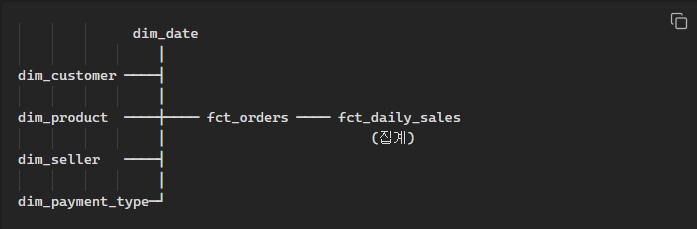
fct_orders (Grain: 주문 아이템)
- 1행 = 주문 1개 아이템
- 5개 차원 FK: customer_id, product_id, seller_id, payment_type, date_key
- 측정값: item_price, freight_value, gross_item_amount, payment_total_value, avg_review_score
fct_daily_sales (Grain: 일별 + 판매자)
- fct_orders에서 집계
- 측정값: order_count, line_count, item_sales, freight_sales, gross_sales
Grain 설계 결정
이 프로젝트에서 가장 중요한 설계 결정은 분석 Grain을 “주문 아이템”으로 설정한 것입니다.
Olist 데이터에서 하나의 주문(order_id)은 여러 아이템을 포함할 수 있습니다. 주문 헤더(orders) 기준이 아닌 주문 아이템(order_items) 기준으로 Grain을 잡아야 상품별, 판매자별 분석이 가능해집니다.
이를 위해 PK를 order_line_id = order_id || '-' || order_item_id로 설계하고, 이 로직을 매크로로 분리했습니다:
-- macros/generate_order_line_id.sql
{% macro generate_order_line_id(order_id_col, item_id_col) %}
    concat({{ order_id_col }}, '-', cast({{ item_id_col }} as varchar))
{% endmacro %}
4. 구현 과정
4-1. 환경 설정
Python 환경 (uv)
# uv로 프로젝트 초기화
uv init dbt_mini_mart
cd dbt_mini_mart

# 의존성 추가
uv add dbt-duckdb "duckdb>=1.0,<2.0"
uv add dagster dagster-dbt dagster-webserver
dbt 프로젝트 설정
# dbt_project.yml
name: mini_mart
version: 1.0.0
config-version: 2
profile: mini_mart

models:
  mini_mart:
    staging:
      +materialized: view       # 변환 비용 최소화
      +schema: stg
    intermediate:
      +materialized: view       # 중간 결과물은 뷰로 유지
      +schema: int
    gold:
      +materialized: table      # 최종 분석용은 테이블로 물리화
      +schema: gold
Materialization 전략: Staging/Intermediate는 단순 변환이므로 뷰(view)로 비용을 줄이고, Gold는 분석 쿼리 성능을 위해 테이블(table)로 물리화했습니다.
패키지 설치
# packages.yml
packages:
  - package: dbt-labs/dbt_utils
    version: [">=1.1.0", "<2.0.0"]
dbt depsdbt_utils에서 활용한 기능:
date_spine(): dim_date 생성unique_combination_of_columns: 복합 PK 유일성 테스트accepted_range: 값 범위 검증
4-2. Raw Layer — 원천 데이터 적재
dbt seed는 작은 참조 테이블용이므로, 원천 데이터는 Python 스크립트로 DuckDB에 직접 벌크 로드합니다.
# scripts/load_raw_to_duckdb.py
con = duckdb.connect(str(DB_PATH))
con.execute("create schema if not exists raw")

for table in RAW_TABLES:
    csv_path = resolve_csv_path(table, source_dir)
    con.execute("""
        create or replace table raw.{table} as
        select *, current_timestamp as _loaded_at
        from read_csv_auto(?, header=true)
    """, [str(csv_path)])
설계 포인트:
_loaded_at자동 추가 — dbt source freshness와 연동- 파일명 후보 매핑 — Kaggle 원본(
*_dataset.csv)과 가공 파일(*.csv) 모두 지원 - 소스 디렉토리 우선순위 — CLI 인자 → 환경변수(
MINI_MART_SOURCE_DIR) →data/common→data/raw
dbt에서는 source() 함수로 raw 계층을 참조합니다:
# models/raw/raw_sources.yml
sources:
  - name: raw
    schema: raw
    loaded_at_field: _loaded_at
    freshness:
      warn_after: { count: 24, period: hour }
      error_after: { count: 72, period: hour }
    tables:
      - name: olist_orders
        columns:
          - name: order_id
            tests: [unique, not_null]
      # ... 8개 테이블 전체 정의
실행:
# CSV → DuckDB 적재
python scripts/load_raw_to_duckdb.py

# freshness 확인
dbt source freshness
4-3. Staging Layer — 타입 캐스팅과 정제
Staging의 원칙: 원천 데이터의 “형태”만 정리하고, 비즈니스 로직은 넣지 않는다.
stg_orders — Grain 변경이 핵심
-- models/staging/stg_orders.sql
with orders as (
    select * from {{ source('raw', 'olist_orders') }}
),
lines as (
    select * from {{ source('raw', 'olist_order_items') }}
)
select
    {{ generate_order_line_id('l.order_id', 'l.order_item_id') }}
        as order_line_id,
    o.order_id,
    o.customer_id,
    l.seller_id,
    cast(o.order_purchase_timestamp as timestamp) as order_purchase_ts,
    cast(o.order_purchase_timestamp as date)      as order_date,
    o.order_status,
    l.product_id,
    cast(l.order_item_id as integer) as order_item_id,
    cast(l.price as double)          as item_price,
    cast(l.freight_value as double)  as freight_value,
    cast(l.price as double) + cast(l.freight_value as double) as gross_item_amount
from lines l
join orders o on l.order_id = o.order_id
여기서 가장 중요한 결정:
olist_orders(주문 헤더)와olist_order_items(주문 아이템)를 inner join- Grain이
order_id→order_line_id(주문 아이템)로 변경 - 파생 컬럼
gross_item_amount = item_price + freight_value
stg_products — 번역 테이블 조인
-- models/staging/stg_products.sql
select
    p.product_id,
    p.product_category_name,
    t.product_category_name_english,   -- 포르투갈어 → 영문 변환
    cast(p.product_weight_g as integer) as product_weight_g,
    -- ...
from {{ source('raw', 'olist_products') }} p
left join {{ source('raw', 'product_category_name_translation') }} t
    on p.product_category_name = t.product_category_name
LEFT JOIN을 사용한 이유: 번역이 없는 카테고리가 있어도 상품을 누락시키지 않기 위해서입니다.
나머지 Staging 모델
| 모델 | 핵심 변환 |
|---|---|
stg_customers | zip_code를 varchar로 캐스팅 (앞자리 0 보존) |
stg_payments | payment_value → double, payment_sequential → integer |
stg_reviews | review_score → integer, 텍스트 코멘트 제외 |
stg_sellers | zip_code를 varchar로 캐스팅 |
4-4. Intermediate Layer — 비즈니스 로직 결합
int_orders_enriched는 staging의 여러 모델을 결합하여 분석에 필요한 파생 컬럼을 만듭니다.
-- models/intermediate/int_orders_enriched.sql (핵심 로직)

-- 1. 주문별 결제 총액
payment_by_order as (
    select order_id, sum(payment_value) as payment_total_value
    from {{ ref('stg_payments') }}
    group by 1
),

-- 2. 주결제수단 선정 (금액 기준 최상위)
payment_type_ranked as (
    select
        order_id, payment_type,
        row_number() over (
            partition by order_id
            order by sum(payment_value) desc, payment_type
        ) as rn
    from {{ ref('stg_payments') }}
    group by 1, 2
),

-- 3. 주문별 평균 리뷰 점수
review_by_order as (
    select order_id, avg(cast(review_score as double)) as avg_review_score
    from {{ ref('stg_reviews') }}
    group by 1
),

-- 4. 주문별 아이템 수
item_count as (
    select order_id, count(*) as order_item_count
    from base
    group by 1
)
파생 컬럼 요약:
| 컬럼 | 로직 | 기본값 |
|---|---|---|
payment_total_value | 주문 전체 결제 합계 | 0 |
primary_payment_type | 금액 기준 최상위 결제수단 | ’unknown’ |
avg_review_score | 주문 평균 리뷰 점수 | NULL |
order_item_count | 해당 주문의 아이템 수 | — |
설계 의도:
primary_payment_type은 한 주문에 여러 결제수단이 사용될 수 있으므로, “가장 큰 금액을 차지하는 수단”을 대표값으로 선정합니다. 동점 시에는 payment_type 알파벳순으로 결정합니다.
4-5. Gold Layer — 스타스키마
Gold 계층에서 최종 스타스키마를 구성합니다. Materialization은 table로 설정하여 분석 쿼리 성능을 확보합니다.
차원 테이블 (Dimension)
| 차원 | 소스 | Grain | 특이사항 |
|---|---|---|---|
dim_customer | stg_customers | customer_id | pass-through |
dim_product | stg_products | product_id | 영문 카테고리 포함 |
dim_seller | stg_sellers | seller_id | pass-through |
dim_payment_type | stg_payments | payment_type | DISTINCT 추출 + label 생성 |
dim_date | dbt_utils.date_spine | date_key | 2016-01-01 ~ 2019-01-01 |
dim_date 생성에는 dbt_utils.date_spine()과 프로젝트 전역 매크로를 활용합니다:
-- macros/date_range.sql
{% macro date_range_start() %}
    cast('2016-01-01' as date)
{% endmacro %}

{% macro date_range_end() %}
    cast('2019-01-01' as date)
{% endmacro %}
-- models/gold/dim_date.sql
with spine as (
{{ dbt_utils.date_spine(
datepart='day',
start_date=date_range_start(),
end_date=date_range_end()
) }}
)
select
cast(date_day as date) as date_key,
extract(year from date_day) as year_num,
extract(month from date_day) as month_num,
extract(day from date_day) as day_num,
strftime(date_day, '%Y-%m') as year_month,
case when extract(dow from date_day) in (0, 6) then true else false end as is_weekend
from spine날짜 범위를 매크로로 중앙 관리하면, dim_date와 데이터 검증 테스트에서 동일한 범위를 참조할 수 있어 불일치를 방지합니다.
팩트 테이블 (Fact)
fct_orders — 주문 아이템 단위
-- models/gold/fct_orders.sql
select
    o.order_line_id,
    o.order_date          as date_key,       -- → dim_date
    o.customer_id,                            -- → dim_customer
    o.product_id,                             -- → dim_product
    o.seller_id,                              -- → dim_seller
    o.primary_payment_type as payment_type,   -- → dim_payment_type
    o.order_status,
    o.order_item_id,
    o.order_item_count,
    o.item_price,
    o.freight_value,
    o.gross_item_amount,
    o.payment_total_value,
    o.avg_review_score
from {{ ref('int_orders_enriched') }} o
fct_daily_sales — 일별 판매자 집계
-- models/gold/fct_daily_sales.sql
select
    date_key,
    seller_id,
    count(distinct order_id) as order_count,
    count(*)                 as line_count,
    sum(item_price)          as item_sales,
    sum(freight_value)       as freight_sales,
    sum(gross_item_amount)   as gross_sales
from {{ ref('fct_orders') }}
group by 1, 2
4-6. 테스트와 문서화
테스트 전략 (71개 테스트)
이 프로젝트는 3종류의 테스트를 활용합니다:
1) Generic Tests (스키마 테스트) — 63개
각 모델의 _schema.yml에서 선언적으로 정의:
# models/gold/gold_schema.yml (예시)
models:
  - name: fct_orders
    columns:
      - name: order_line_id
        tests: [unique, not_null]
      - name: customer_id
        tests:
          - relationships:
              to: ref('dim_customer')
              field: customer_id
      - name: item_price
        tests:
          - dbt_utils.accepted_range:
              min_value: 0
테스트 유형별 분류:
| 유형 | 수 | 예시 |
|---|---|---|
| unique / not_null | 20+ | PK 무결성 |
| relationships | 5 | FK 참조 무결성 (fct_orders → 5개 dim) |
| accepted_values | 2 | payment_type 허용값 |
| accepted_range | 6 | 금액 >= 0, 리뷰 1~5점 |
| unique_combination_of_columns | 1 | fct_daily_sales 복합 PK |
2) Source Freshness — 8개
freshness:
  warn_after: { count: 24, period: hour }
  error_after: { count: 72, period: hour }
모든 raw 테이블에 적용. _loaded_at 컬럼 기준으로 데이터 신선도를 모니터링합니다.
3) Singular Tests (커스텀 검증) — 3개
-- tests/assert_daily_sales_reconciles.sql
-- fct_daily_sales 합계와 fct_orders 합계의 정합성 검증
with daily as (
    select sum(gross_sales) as total from {{ ref('fct_daily_sales') }}
),
orders as (
    select sum(gross_item_amount) as total from {{ ref('fct_orders') }}
)
select *
from daily cross join orders
where abs(daily.total - orders.total) > 0.01 -- 소수점 오차 허용| 테스트 | 검증 내용 |
|---|---|
assert_daily_line_count_matches | fct_daily_sales의 line_count 합 = fct_orders 총 행 수 |
assert_daily_sales_reconciles | fct_daily_sales의 gross_sales 합 = fct_orders의 gross_item_amount 합 |
assert_orders_within_date_range | 모든 주문 날짜가 dim_date 범위(2016~2019) 내 |
문서화
dbt docs block으로 비즈니스 컨텍스트를 코드 옆에 유지합니다:
<!-- models/docs.md -->
{% docs grain_order_line %}
이 모델의 Grain은 **주문 아이템(order line)**입니다.
한 주문(order_id)에 여러 아이템이 포함될 수 있으며,
`order_line_id = order_id || '-' || order_item_id`가 PK입니다.
{% enddocs %}

{% docs primary_payment_type %}
한 주문에 복수 결제수단이 사용될 수 있습니다.
`primary_payment_type`은 결제 금액 합계가 가장 큰 수단을 선정하며,
동점 시 payment_type의 알파벳 순으로 결정됩니다.
{% enddocs %}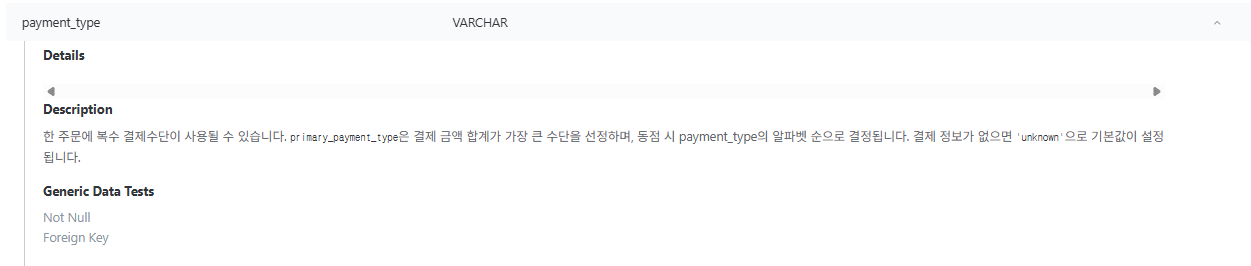
dbt docs generate && dbt docs serve4-7. Dagster 오케스트레이션
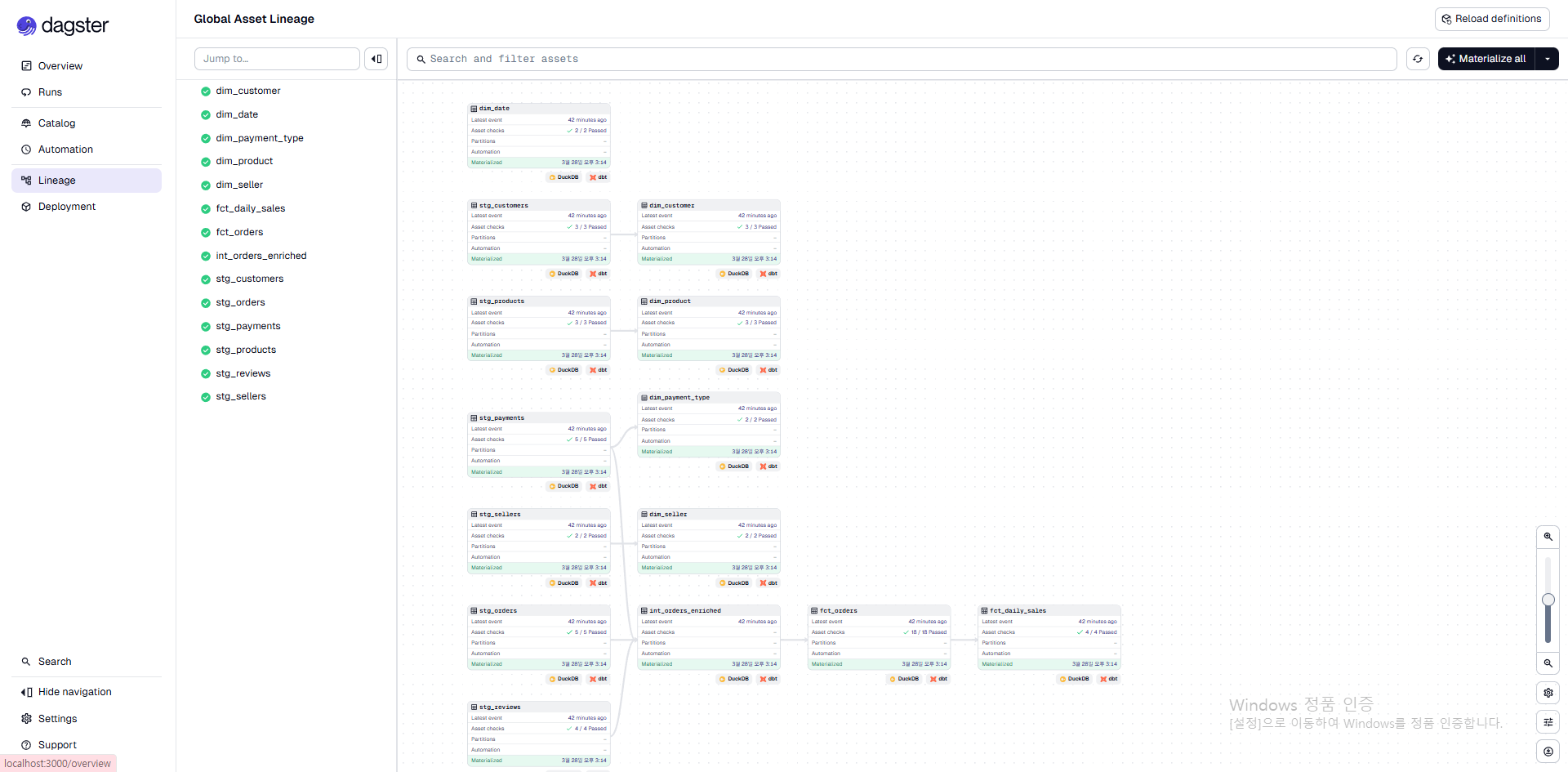
dbt 모델을 Dagster Asset으로 자동 매핑하여, 웹 UI에서 DAG를 시각화하고 실행할 수 있습니다.
프로젝트 설정
# dagster_mini_mart/project.py
from dagster_dbt import DbtProject

dbt_project = DbtProject(
    project_dir=DAGSTER_DBT_PROJECT_DIR,
    target_path=DAGSTER_DBT_PROJECT_DIR / "target",
)
dbt_project.prepare_if_dev()
Asset 정의
# dagster_mini_mart/assets.py
from dagster import AssetExecutionContext
from dagster_dbt import DbtCliResource, dbt_assets

@dbt_assets(manifest=dbt_project.manifest_path)
def dbt_mini_mart_dbt_assets(context: AssetExecutionContext, dbt: DbtCliResource):
    yield from dbt.cli(["build"], context=context).stream()
@dbt_assets 데코레이터가 dbt manifest를 읽어서, 14개 dbt 모델 + 8개 source = 22개 Dagster Asset을 자동 생성합니다. dbt build는 모델 빌드와 테스트를 DAG 순서대로 실행합니다.
Asset Catalog — dbt 메타데이터가 Dagster UI에 노출되는 구조
@dbt_assets(manifest=...)가 manifest를 파싱할 때, dbt schema.yml에 작성한 description·컬럼 정보·테스트 목록·Raw SQL까지 함께 읽어서 Dagster Asset의 메타데이터로 등록합니다.
이 덕분에 Dagster UI의 Asset Catalog에서:
- 모델별 Description (docs block 포함)
- Raw SQL 원문
- 컬럼별 설명과 Generic Data Tests 적용 현황
을 코드 저장소를 열지 않고도 바로 확인할 수 있습니다.
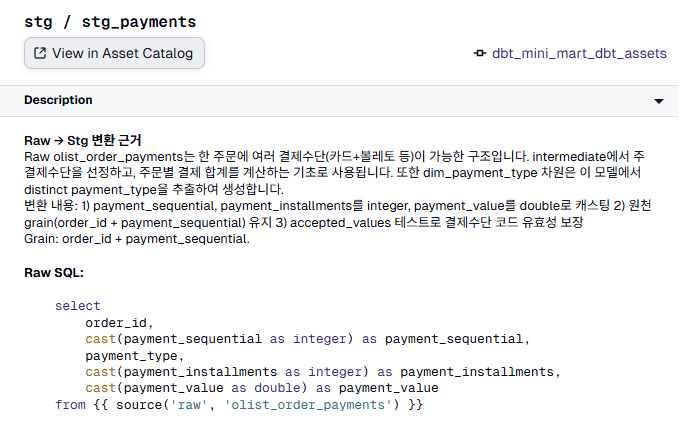
Airflow에서는 dbt가 BashOperator나 Cosmos를 통해 “태스크”로 실행될 뿐이고, 모델 단위의 설명·SQL·테스트 메타데이터가 Airflow UI에 노출되지 않습니다. 이 차이가 dbt 프로젝트에서 Dagster를 선택하게 된 가장 실용적인 이유 중 하나였습니다.
Definitions
# dagster_mini_mart/definitions.py
defs = Definitions(
    assets=[dbt_mini_mart_dbt_assets],
    resources={
        "dbt": DbtCliResource(project_dir=dbt_project),
    },
)
실행
dagster dev
# → http://localhost:3000 에서 Asset DAG 확인 및 실행
5. 회고 및 배운 점
잘 된 점
- Grain을 먼저 정의하니 모든 설계가 따라왔다. order_line_id를 PK로 잡은 결정이 이후 모든 조인과 집계의 기준이 됐습니다.
- 매크로로 로직을 중앙 관리하니 일관성이 유지됐다.
date_range_start/end를 dim_date와 테스트에서 동시에 참조하니, 범위 불일치 버그가 원천 차단됩니다. - DuckDB로 빠르게 반복 개발할 수 있었다. 클라우드 비용 없이 수만 행의 데이터를 로컬에서 즉시 테스트할 수 있었습니다.
어려웠던 점
- 결제 데이터의 1:N 관계 처리: 한 주문에 여러 결제수단이 사용될 수 있어,
primary_payment_type을 선정하는 로직이 필요했습니다. - Staging에서 비즈니스 로직의 경계 설정: “언제까지가 정제이고 언제부터 비즈니스 로직인가”의 판단이 중요했습니다. 이 프로젝트에서는 “두 테이블 이상의 정보를 결합하는 순간”을 Intermediate로 분리하는 기준을 적용했습니다.
개선 가능한 부분
- Incremental 모델 적용 (대용량 시나리오)
- dbt Metrics / Semantic Layer 도입
- CI/CD에서
dbt build+dagster asset materialize자동화
프로젝트 링크
- GitHub: kgeonhoe/dbt_mini_mart
- 데이터 출처: Olist Brazilian E-Commerce Dataset (Kaggle)